


MySYS Global API

MySYS Global API

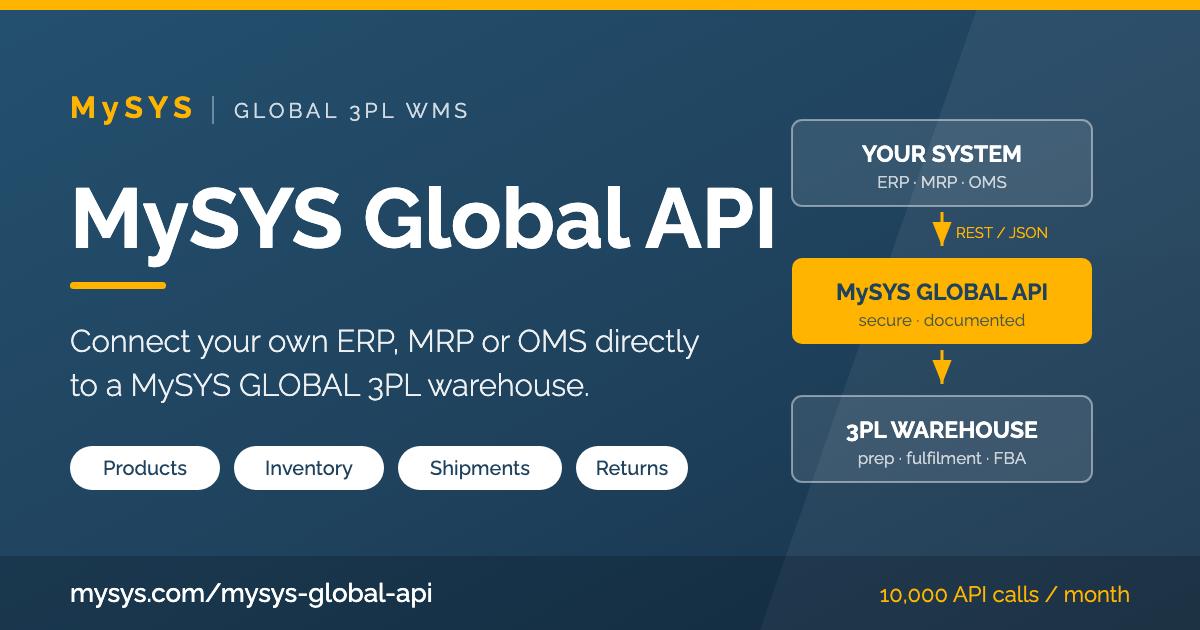
MySYS Global API connects your own software directly to a 3PL warehouse running on the MySYS GLOBAL infrastructure. Your in-house ERP, MRP, OMS or e-commerce platform can create products, send stock to the warehouse, follow inventory levels, issue shipment instructions and query shipment status — without your team ever leaving their own screens. Instead of two systems that have to be reconciled by hand, you get one flow of data from your order screen all the way to the buyer's door.

Connect your own system to a MySYS GLOBAL warehouse

What MySYS Global API Gives You

MySYS Global API is a REST/JSON web service covering the complete operational cycle of a prep center: product definition, inbound shipments to the warehouse, inventory, outbound fulfilment to the end buyer, FBA transfers to Amazon, returns, shipping labels and invoicing. Every action your customers perform on the MySYS panel has an API counterpart, so an integrated system is never a second-class citizen.

  • Product & catalogue definition — create and update products in the warehouse catalogue from your own system
  • Inbound to the warehouse — announce and track stock you send in for storage
  • Inventory tracking — query live stock, per product or per warehouse
  • Shipment instructions — create outbound orders, compare carrier rates, generate and void labels
  • FBA transfers — move goods from the warehouse to Amazon fulfilment centres, with documents and FNSKU files
  • Returns management — open return shipments, attach photos and documents
  • Status & documents — tracking, delivery status, service items and invoices, all machine-readable
Before you start — two conditions must be met

Who Can Use MySYS Global API

1

The integrating party needs the API package

The company that will connect its own system — you, or your customer — must hold the relevant MySYS API package. The Global API package is listed on our pricing page together with its monthly fee, its one-time installation fee and its monthly call allowance.

2

The warehouse needs MySYS Global Silver

The warehouse (depot) the integration will operate on must be subscribed to the MySYS Global Silver package or above. Without it, API access to that depot's data is not opened.

For a depot package change, please contact your .

In short: the API package sits on the integrating side, the Silver package sits on the warehouse side. Both are required — one without the other is not enough to open an integration.

One integration, the whole warehouse network behind it

How It Works

MySYS Global API integration architecture YOUR SYSTEM In-house ERP MRP / Production OMS / Order manager E-commerce platform Your screens, your workflow HTTPS REST / JSON API token MySYS GLOBAL API authentication · validation · rate limit Product Inventory Inbound Shipment FBA Return Swagger / OpenAPI · Postman collection MySYS GLOBAL 3PL WMS Receiving & put-away Picking, packing, prep 40+ carrier integrations Marketplace integrations Warehouse staff keep working as usual Your system stays the single source of truth — MySYS executes the physical operation and reports back.
MySYS Global API sits between your software and the warehouse floor: you send instructions, MySYS runs the operation and returns status.
From first call to delivered parcel

The Integration Flow in 7 Steps

This is the order our own API guide follows. Steps 1–3 are the one-time set-up; steps 4–7 are the operational loop your system will run every day.

MySYS Global API integration flow 1 2 3 4 5 6 7 Choosewarehouse Createuser Defineproduct Send stockinbound Queryinventory Fulfiloutbound / FBA Handlereturns Warehouse User Product WarehouseShipment Inventory Shipment / Fba Return — one-time set-up — — daily operational loop —
Each step maps to one endpoint group, so you can go live gradually — catalogue first, fulfilment later.
  • 1. Choose the warehouse

    List the depots available to your account and pick the one you will work with.

  • 2. Create the user

    Define the system users your integration will act on behalf of, and their settings.

  • 3. Define products

    Create or update products with their details, then search and read them back.

  • 4. Send stock to the warehouse

    Announce an inbound shipment, follow it, complete or cancel it.

  • 5. Query inventory

    Read live stock for the whole account or for a single product.

  • 6. Fulfil orders

    Create outbound shipments to the buyer, or FBA transfers to Amazon. Compare rates, generate and void labels, track delivery.

  • 7. Handle returns

    Open return shipments for goods coming back, attach product photos and documents.

  • Throughout: documents & billing

    Pull invoices, invoice PDFs and the service items behind every charge, so your accounting stays in sync.

  • Throughout: status queries

    Ask for shipment status, tracking events and delivery confirmation whenever your system needs them.

Nothing exotic — a plain, well-documented REST API

Technical Summary

  • Protocol HTTPS only, REST style
  • Payload format JSON request and response bodies
  • Authentication API key sent in the Authorization request header
  • Version v1
  • Call allowance 10,000 API calls per month in the standard Global API package
  • Specification OpenAPI / Swagger JSON, importable into your own tooling
  • Client kit Postman collection with ready-made requests
  • Interactive docs Browsable reference with request and response schemas
What you receive when the package is activated

Documentation Access

Once your MySYS API package is active, your account gains direct access to:

  • API documentation Endpoint by endpoint, with fields and examples
  • Swagger / OpenAPI The machine-readable contract, for code generation and testing
  • Postman collection Import it, set your token, send your first request

You will find them inside your MySYS panel, under your profile's API documents area — no separate developer portal to sign up for.

The questions our Project Managers hear most often

Frequently Asked Questions

Which packages do I need, exactly?

Two, on two different sides. First, the party doing the integration must hold the relevant MySYS API package — for this API, the MySYS Global API package listed on our pricing page. Second, the warehouse you will operate on must be on MySYS Global Silver or above.

If the depot is currently on a lower package, your Project Manager can arrange the change — the API cannot be opened for that depot until it is done.


How do I get the documentation?

Documentation is released together with the package. As soon as your MySYS API package is active, your account can reach the API reference, the Swagger / OpenAPI definition and the Postman collection directly from your MySYS panel. Your developers can import the collection and make their first authenticated call the same day.


How is the API secured?

Every request travels over HTTPS and carries an API key in the Authorization header. Calls are scoped to your account, so an integration can only see and change the data that belongs to it. Keep your key on your server side — it should never be embedded in a browser or mobile client.

What are the usage limits?

The standard Global API package includes 10,000 API calls per month, which comfortably covers a typical prep-center workload when your system calls us on events rather than polling in a loop. If your volume is higher, talk to your Project Manager — the allowance can be raised.

Do I have to replace my current software?

No — that is the whole point. Your ERP, MRP or OMS stays exactly where it is and remains your team's working environment. MySYS Global API only adds a channel between that system and the warehouse, so orders, stock and shipment status flow automatically instead of being re-typed. You can also adopt it gradually: start with the product catalogue, add fulfilment once you are comfortable.

Can I offer this to my own customers?

Yes. Software houses and marketplaces integrate MySYS Global API on behalf of their own users, so their customers get warehouse services without ever leaving their platform. The package requirements are the same: the integrating party holds the API package, and the depot being served is on MySYS Global Silver or above.

Ready to connect your own system?

Check the MySYS API packages, then let's go over your integration scenario together.
Your Project Manager will confirm the depot's package and open your documentation access.

Already a MySYS customer? for a depot package change or an integration walkthrough.

  • Amazon
  • Amazon Vendor
  • Etsy
  • eBay
  • Walmart
  • Kaufland
  • Shopify
  • WooCommerce
  • Amazon Shipping
  • APC
  • Aramex
  • Asendia
  • Canada Post
  • DHL eCommerce NL
  • DHL Parcel DE
  • DHL Parcel NL
  • DHL Parcel UK
  • DPD
  • DPD
  • DPD UK
  • DPD DE
  • DPD NL
  • DX
  • EasyPost
  • Emirates Post
  • ePost Global
  • eShipper
  • Eurosender
  • EVRi
  • FedEx
  • GLS
  • HepsiJet
  • Jumingo
  • MNG
  • MyDHL
  • MySYS Post
  • Packlink
  • Parcel2GO
  • PostNL
  • PTT Kargo
  • Purolator Canada
  • Royal Mail
  • SendCloud
  • Shippo